
Channels
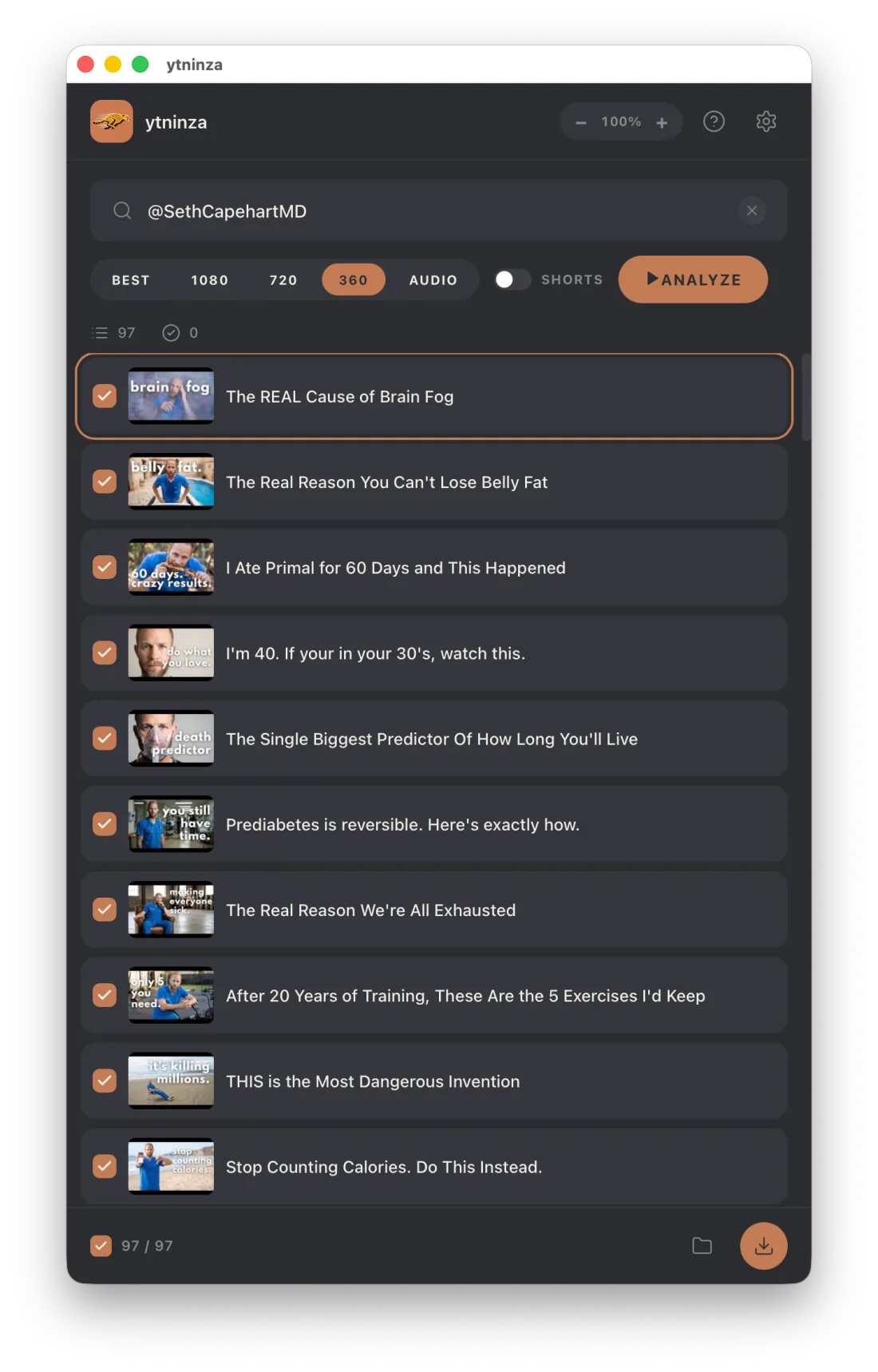
Analyze a channel and select the videos you want to save, including large channel libraries.
YouTube downloads for authorized offline use
ytninza is a free desktop app for downloading YouTube channels, playlists, individual videos, and audio in a format that is easy to organize offline.
What it does
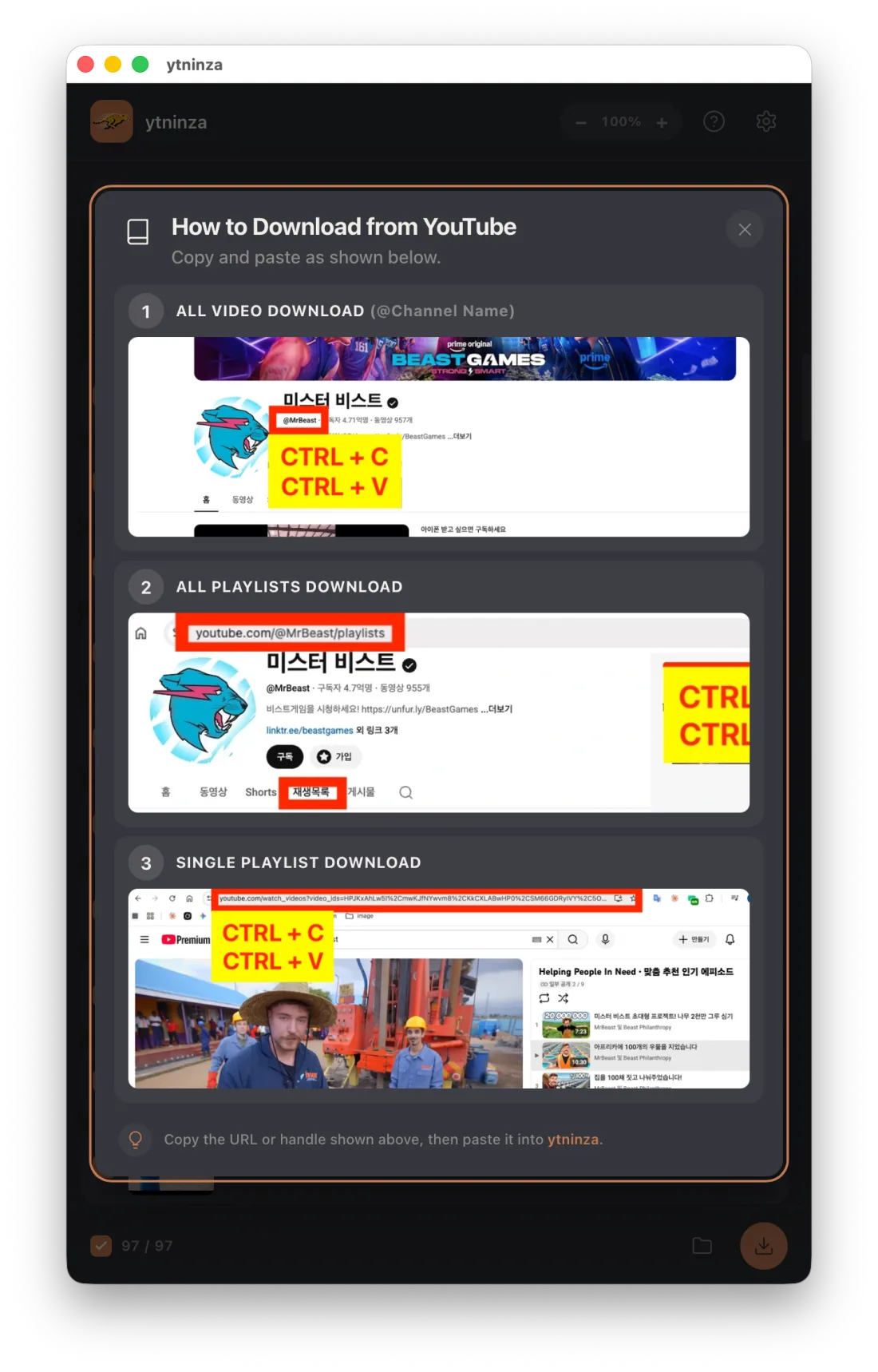
Paste a YouTube URL or channel handle, review the results, choose a quality, and save the selected content to your computer.
Analyze a channel and select the videos you want to save, including large channel libraries.
Download one playlist or browse all public playlists from a channel.
Choose 360p, 720p, 1080p, best available quality, or save an audio track as M4A when available.
Files are named by upload date and title so downloaded series remain easy to sort and watch in order.
Inside the app
Analyze, select, and download from one compact interface.
Current pricing
ytninza currently has no subscription, paid plan, or in-app purchase. A personal YouTube Data API key is optional; the app can also use its yt-dlp fallback without one.
Responsible use
Users may only save content they own or have permission to download. ytninza does not bypass DRM, paywalls, or access restrictions.
This statement does not override or resolve obligations under YouTube’s Terms of Service or any other platform rules. You are responsible for confirming that your use complies with applicable laws, licenses, and service terms.
Effective date: July 13, 2026
This landing page does not use analytics, advertising trackers, account registration, contact forms, or first-party cookies. To remember a manual language choice, it stores one local preference named ytninza-language in browser storage. The site is hosted by GitHub Pages, so GitHub may process technical request data such as IP addresses and user-agent information under its own privacy terms.
Information you voluntarily post in a public GitHub issue is used only to investigate reported problems and maintain compatibility. Do not include personal information, raw logs, or local paths. Information is not sold. GitHub may process ordinary account and connection data under its own privacy terms.
You may use the app without entering a YouTube Data API key. You may delete local settings and downloaded files from your device. You control information you post in a public issue and should remove it if it is no longer needed.
Privacy inquiries: public issue tracker
Effective date: July 13, 2026
By downloading or using ytninza, you agree to these terms. You may use the app only for lawful purposes and only with content you own or are authorized to download, save, convert, or access offline.
You are responsible for the URLs you submit, the files you create, and compliance with copyright law, licenses, YouTube’s Terms of Service, and the rules of any other service you access. Do not use ytninza to infringe rights, bypass restrictions, redistribute unauthorized copies, or interfere with a third-party service.
ytninza relies on third-party services and open-source software, including YouTube, Google APIs, yt-dlp, and FFmpeg. Their availability and behavior may change without notice. ytninza is not affiliated with, endorsed by, or sponsored by YouTube or Google.
The app is currently provided free of charge and may be updated, changed, suspended, or discontinued. Features may stop working when third-party services change. No guarantee is made that every URL, format, operating system, or service will remain supported.
ytninza is provided “as is” and “as available,” without warranties of uninterrupted operation, fitness for a particular purpose, or data preservation. To the maximum extent permitted by law, the operator is not liable for content loss, account restrictions, service interruptions, legal claims, or indirect damages arising from use of the app. Keep backups of important files.
Questions about these terms: public issue tracker
Effective date: July 13, 2026
Users may only save content they own or have permission to download. ytninza is a local-purpose tool and does not grant any license to third-party videos, music, images, or metadata.
ytninza does not bypass DRM, paywalls, or access restrictions. It must not be used to defeat technological protection measures or obtain private, paid, members-only, or otherwise restricted content without authorization.
The operator does not host, index, or distribute downloaded media through this website. Downloads are requested by the user and written to the user’s own device.
If you believe the software or this website raises a specific copyright concern, open a non-sensitive summary in the public issue tracker. Do not post identity, contact details, or other personal information. The operator will review sufficiently detailed reports and take appropriate action where necessary.
YouTube and Google are trademarks of their respective owners. Their names are used only to describe compatibility and are not evidence of sponsorship, approval, or affiliation.
Operator: NinjaTurtle — Independent Developer
Public issue tracker: github.com/sunpark20/errorreport/issues
Source and releases: github.com/sunpark20/YT-Chita